Main menu - View
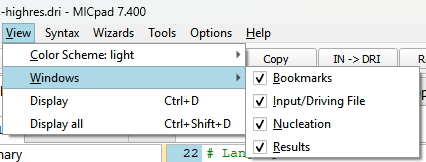
Colar Scheme: Light and dark mode
After activating a different mode, a restart of MICpad is necessary to apply the new mode.
Windows
The different view sections of MICpad can set on and off here.
A special case is the 'Nucleation' tab. This is a quite new feature which is only not helpful when working with older versions (less 7.4) of MICRESS. If the view is not checked here, it will be switched off temporarily, i.e. for this input file.
The view menu
See also the Toolbar for the toggling buttons 'B' Bookmarks, 'D' Driving File, and 'R' Results.
Display
The menu entry is the same as the 'Display' button in the result list. It will open the checked field results of the current tab in the viewer 'DP_MICRESS'.
Be aware that each call will open a new DP_MICRESS.
Display all
Same as 'Display' but all checked field results in all open tabs will be passed to the viewer.